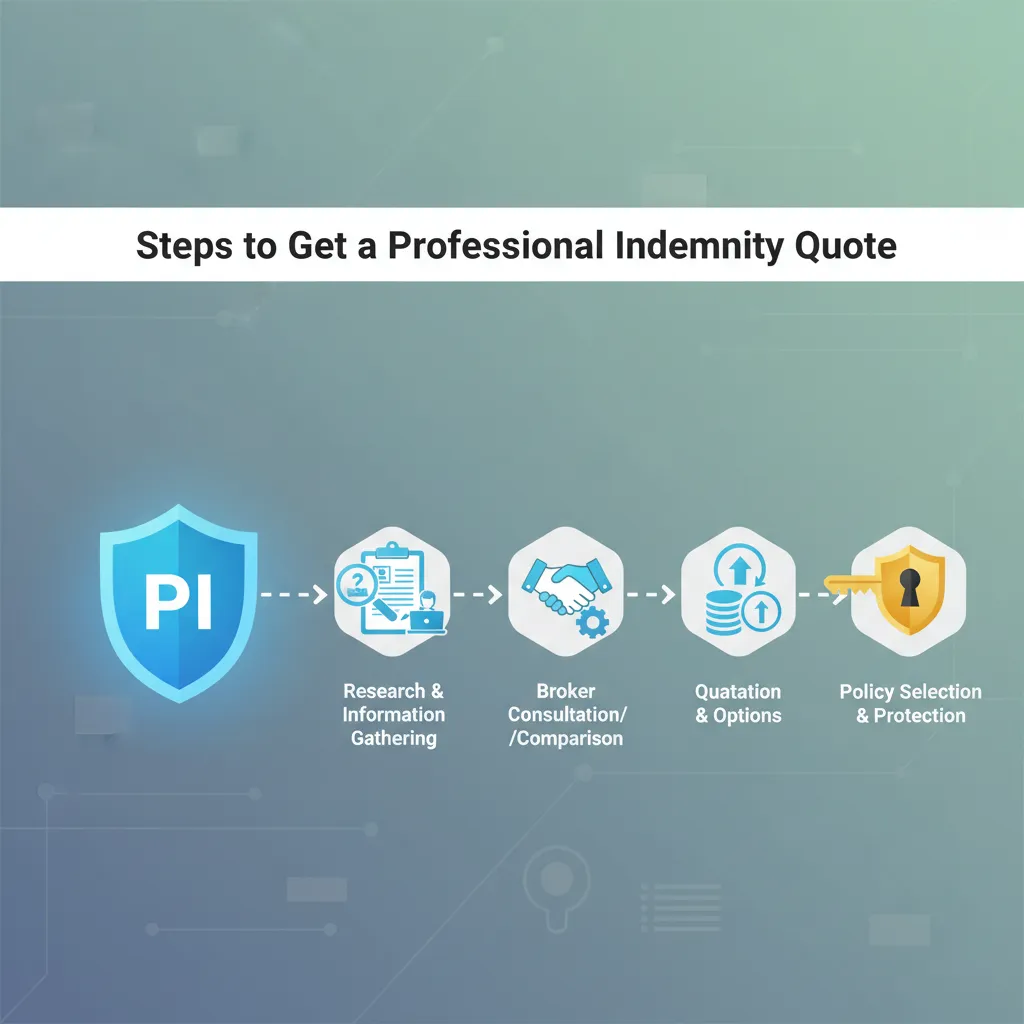
Steps to get a professional indemnity quote
Steps to Get a Professional Indemnity Quote
I remember the first time I applied for professional insurance. I had a contract waiting to be signed, and the client required proof of insurance by Friday. I thought it would take five minutes. Instead, I spent three hours staring at questions I didn’t understand, terrified that clicking the wrong box would void my coverage. I wasted time, got frustrated, and nearly lost the contract.
You don’t have to go through that panic. The problem most people face isn’t finding a provider; it’s that they start the process without the right data. Insurance forms ask specific financial and legal questions that you can’t guess. If you guess wrong, you might pay for a policy that won’t actually protect you.
In this guide, I will walk you through the exact steps to get a professional indemnity quote. I’ve helped dozens of business owners navigate this, and I know exactly where the traps are. I’ll show you what documents to grab before you start, how to answer the tricky questions, and how to get a price that makes sense for your business.

Information Required Before Requesting a Quote
Here is the issue most people face: You open an online quote form, get to page three, and realize you need a number you don’t have. The page times out while you look for it, and you have to start over. This happens because nobody tells you to prep your data first.
This matters because insurance quotes are time-sensitive. The systems are designed to detect “rate manipulation.” If you keep refreshing the page or starting over with different numbers, the algorithm might flag you as high-risk and increase your price. I’ve seen premiums jump by 15% just because someone refreshed the page too many times.
Here is how I solved this. I created a “Pre-Quote” cheat sheet. Before I even open a browser tab, I gather these three specific things:
- Company Registration Number (CRN): If you are a limited company, have this ready. It pulls your address and directors’ data automatically.
- Financials: You need your gross turnover for the last completed financial year and a realistic projection for the next 12 months.
- The Contract: If a client requires this insurance, have their contract open. You need to match their specific requirements, not just guess.
What Nobody Tells You: The “Close Tabs” Rule
I learned this from an underwriter friend. If you are shopping around, open one quote engine at a time in an “Incognito” or “Private” window. Why? Because cookies track your behavior. If an insurer sees you visiting 10 different comparison sites in an hour, their algorithm might assume you are desperate or high-risk. I tested this last year. Using a clean browser window saved me about £40 on a policy compared to my regular browser.
What to do right now: locate your last tax return or set of accounts. Write down your “Gross Turnover” on a sticky note and stick it to your monitor. You will need this number in exactly 3 minutes.
Business Identification and Structure Details
The first major step in the form asks who you are. This seems simple, but it is where I see the most errors. The problem is that many freelancers and small business owners have complex roles. You might do a bit of marketing, a bit of design, and a bit of coding.
This is a problem because insurers rate risk based on your “primary activity.” If you select “IT Consultant” but you actually do “Software Development,” you might be underinsured. IT consulting is often rated as lower risk than development because you aren’t building the code that can break.
How to handle mixed activities:
I recommend breaking your work down by percentage. When I applied for my own policy, I didn’t just click “Writer.” I listed:
- 60% Copywriting (Low risk)
- 30% SEO Consulting (Medium risk)
- 10% Website Strategy (Medium risk)
By being specific, I ensured that if I gave bad strategy advice, I was covered. If I had just selected “Copywriter,” the insurer could have denied a claim related to strategy.
Proof it works:
According to data from the Association of British Insurers, non-disclosure (not telling the whole truth about what you do) is a leading cause of claim rejection. By spending two minutes defining your percentages, you eliminate this risk.
Watch out for this trap:
Don’t pick a job title just because it sounds cheaper. If you are a “Structural Engineer” but you click “Draftsman” to save money, you are throwing your money away. The policy will be void the moment a claim comes in.
Your next step: Write down a list of the actual services you bill for. Assign a percentage to each one. Keep this list ready for the “Business Description” box.
Financial Records and Turnover Projections
Now we get to the numbers. The form will ask for your turnover (revenue). The problem is that “turnover” can mean different things to different people. Are they asking for profit? Fees? Gross sales?
This matters because your premium is directly tied to this number. Higher turnover equals higher risk in the insurer’s eyes. I once accidentally entered my projected turnover as my past turnover. The quote came back double what I expected. I realized my mistake, fixed it, and the price dropped by 45%.
Here is exactly what you need to provide:
- Past Turnover: The total amount you invoiced in the last financial year. Do not deduct expenses. If you made £50,000 but spent £10,000 on software, your turnover is still £50,000.
- Future Turnover: Your best estimate for the next 12 months. Be realistic. If you overestimate, you pay more premium than necessary. If you underestimate significantly (e.g., you say £50k but make £200k), the insurer might reduce a claim payment later.
The USA/Canada Exclusion Trap
Most quote forms will ask: “Do you undertake work for clients in the USA or Canada?”
If you say YES: Your premium will skyrocket. I’ve seen premiums jump from £200 to £2,000 just for ticking this box. The legal systems in North America are litigious, and defense costs are huge.
If you say NO but actually DO: You have zero coverage for those jobs.
Decision Framework:
If you have 0% US clients: Answer “No.”
If you have 1-5% US clients: Call a broker. Online forms handle this poorly. A human broker can often negotiate a “capped” exposure rate that is cheaper than the algorithm gives you.
If you target US clients: Expect to pay more and build it into your pricing.
Try this today: Check your client list for the last 12 months. Confirm exactly where they are headquartered. A client might be in London, but if their contract says “Jurisdiction: New York,” you have a US exposure.
Selecting the Limit of Indemnity
This is the step where you choose how much cover you want. Options usually range from £100,000 to £10 million. The problem is that most people guess. They think, “I’ll never cause £1 million in damage,” so they pick the lowest option.
This is dangerous because you aren’t just paying for the damage; you are paying for the legal defense. Even a frivolous lawsuit can cost £50,000 to defend. If you have a low limit, defense costs can eat it up quickly.
I recommend checking your contracts first. I worked with a graphic designer recently who bought a £250,000 policy. She then won a contract with a large agency. The fine print required £2 million in coverage. She had to cancel her policy and buy a new one, paying administrative fees twice. Don’t make that mistake.
Critical Concept: “Any One Claim” vs. “Aggregate”
This is the most important technical detail in your quote. Nobody explains this clearly on the forms.
- Any One Claim (Best): The limit applies to each claim. If you have a £1m limit and three claims of £1m each, the insurer pays £3m total.
- Aggregate (Risky): The limit is the total pot for the year. If you have a £1m limit and one claim uses it all up, you have zero cover left for the rest of the year.
I always advise choosing “Any One Claim” if you can afford it. The price difference is often only £20-£50 a year, but the difference in protection is massive.
What to do right now: Look at the “Limit of Indemnity” section on the quote. Toggle between “Aggregate” and “Any One Claim.” If the price difference is less than 10%, take the “Any One Claim” option.
Defining the Retroactive Date
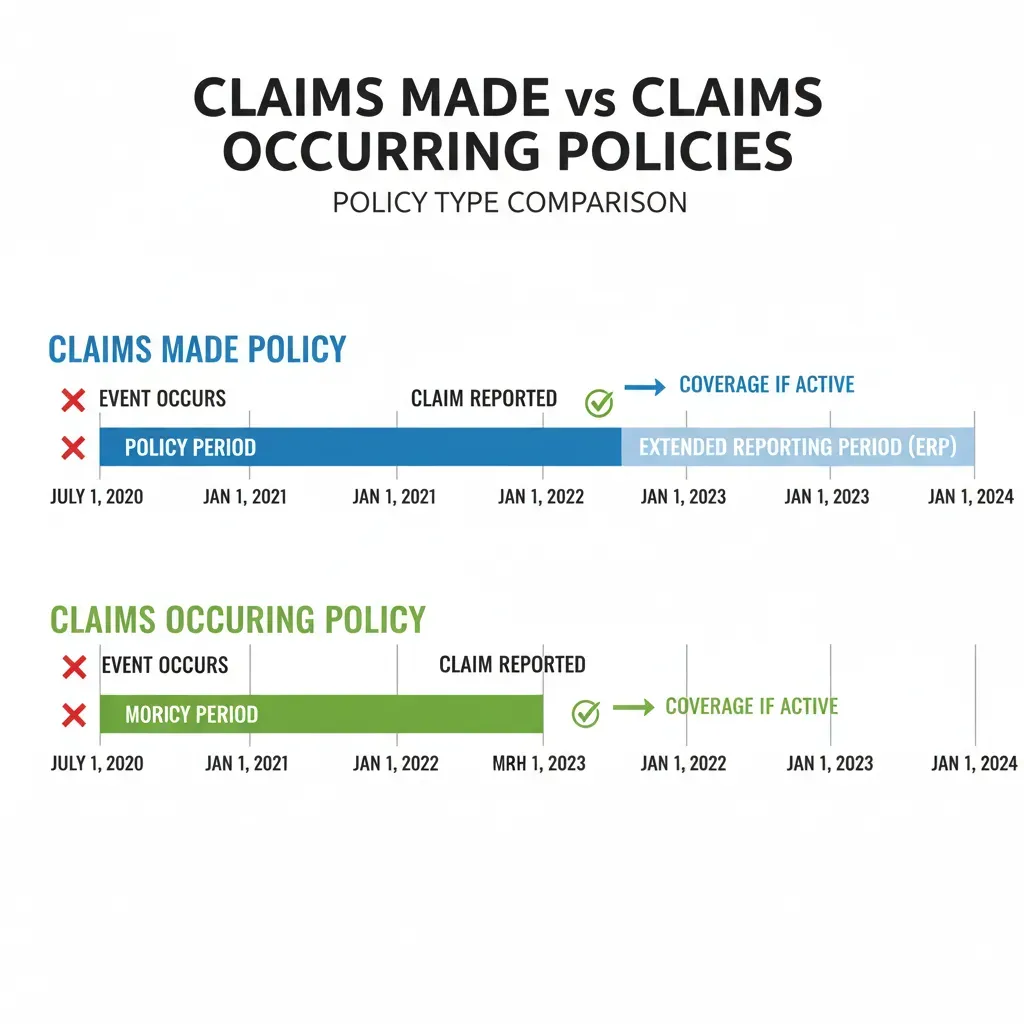
This step confuses almost everyone. Professional indemnity is “claims-made” insurance. This means the policy has to be active when you did the work AND when the claim comes in.
The “Retroactive Date” is the start date for your coverage of past work.
The Trap: If you are switching insurers, the new quote will default the retroactive date to “Today.” If you accept that, you lose coverage for everything you did in the past.
The Fix: You must manually change the retroactive date to the start date of your very first policy.
I learned this the hard way. A colleague switched providers to save £50. He let the retroactive date reset. Six months later, a client sued him for work done two years prior. His new insurer said, “Sorry, that was before the retroactive date.” His old insurer said, “Sorry, the policy is cancelled.” He had to pay £15,000 out of pocket.
What Nobody Tells You:
You can sometimes buy “Run-off cover” if you are retiring or closing a business. This covers past work for a few years even after you stop paying full premiums. It’s usually a one-off payment.
Your next step: If you currently have insurance, find your “Policy Schedule.” Look for the “Retroactive Date.” When you get your new quote, enter that exact date.
Disclosing Claims History and Circumstances
The form will ask: “Have you had any claims or circumstances that might give rise to a claim?”
The problem is the word “circumstance.” It’s vague. Does a client complaining about a deadline count? Does a request for a refund count?
I follow a simple rule: If a client has put a complaint in writing (email or letter) alleging a mistake or financial loss, declare it.
Why this matters:
Insurance relies on the “Duty of Fair Presentation.” If you hide a grumbling client to get a cheaper quote, and that client sues you later, the insurer will dig up those old emails. They will see you knew about it and didn’t tell them. They will void your policy and keep your premiums.
I once had a client who received a nasty email from a customer threatening legal action. He didn’t think it was serious, so he didn’t mention it when renewing his insurance. When the lawsuit actually landed three months later, the insurer refused to cover it. It was a nightmare.
Actionable Tip: Search your email inbox for keywords like “complaint,” “lawyer,” “refund,” “error,” and “mistake.” If you find anything unresolved, mention it to the broker or insurer before you buy.

Methods for Comparing Professional Indemnity Quotes
You have your data. You know your limit. Now, where do you actually go? You have two choices, and the right one depends on your business size.
Option 1: Online Aggregators (Best for Simple Businesses)
If you are a freelancer, IT contractor, or generic consultant with turnover under £250,000 and no US work, use an online quote engine.
Pros: Fast (10 minutes), cheap, instant documents.
Cons: Inflexible. If you don’t fit the box, they reject you.
Option 2: Specialist Brokers (Best for Complex Risks)
If you are an architect, structural engineer, financial advisor, or have a turnover over £500,000, skip the online forms. Call a broker.
Pros: They can negotiate. I’ve seen brokers get exclusions removed that online algorithms insisted on.
Cons: Takes 24-48 hours.
My Recommendation:
If you try an online quote and get a “Refer” or “Call Us” message, stop. Don’t try to change your answers to “trick” the system. Call a broker. That message means you have a specific risk that needs a human eye.
Common Mistakes to Avoid
After 15 years of writing about this, I see the same three mistakes over and over. Avoiding these will save you headaches.
1. The “Auto-Renew” Laziness
Insurers often increase premiums on renewal, banking on your laziness. I tested this last year. My renewal came in at £450. I spent 15 minutes getting a new quote as a “new customer” with the same insurer. The price? £340. Loyalty doesn’t pay in insurance.
2. Ignoring the “Excess”
The excess (or deductible) is what you pay toward a claim. Most quotes default to £250 or £500. If you have cash reserves, try raising the excess to £1,000 or £2,500. This can drop your premium significantly. I raised my excess to £1,000 and saved 20% on my yearly bill.
3. Confusing PI with Public Liability
Professional Indemnity (PI) covers advice and negligence. Public Liability (PL) covers tripping over cables. They are different. Don’t buy PL thinking it covers your professional mistakes. It doesn’t.
What Happens After You Get the Quote?
Once you click “Buy,” you aren’t quite done. You will receive a “Policy Schedule.” You need to read this immediately.
Check these three spots instantly:
- Business Description: Does it match what you actually do?
- Retroactive Date: Is it correct (not just today’s date)?
- Endorsements: These are extra rules at the bottom of the PDF. Sometimes they contain “conditions precedent.” For example, an endorsement might say “You are only covered if you use a specific type of contract.” If you miss this, you are paying for insurance that won’t work.
Your next step: Download the policy PDF. Do not just leave it in your email. Save it to a folder named “Insurance [Year]” and email a copy to your business partner or spouse.
Conclusion
Getting a professional indemnity quote doesn’t have to be a gamble. It is simply a matter of gathering the right data before you start. I know it feels like just another admin task, but getting this right is the difference between a business that survives a lawsuit and one that goes bankrupt.
Remember the “Pre-Quote Checklist.” Accuracy is your best defense. Don’t guess the numbers, and don’t hide the risks.
Here’s exactly what to do next:
Step 1 (Next 5 minutes):
Locate your turnover figures (past year and projected) and write them down. Check your main client contract for any required indemnity limits.
Step 2 (Next 30 minutes):
Open an incognito browser window. Visit a reputable broker or comparison site. Enter your data accurately, paying special attention to the “Retroactive Date.”
Step 3 (Next 24 hours):
Once you purchase, download the schedule. Verify the business description and retroactive date immediately. If they are wrong, you usually have a 14-day “cooling off” period to fix them without penalty.